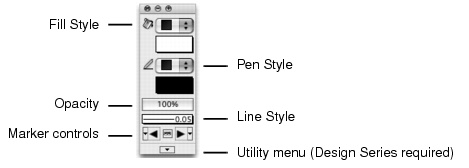
Hatches, images, and gradients, and fill and pen styles, such as color and opacity, can be applied to all Vectorworks objects except text. The only text characteristics that can be changed with the Attributes palette are pen color and opacity; however, the text box itself can accept fill attributes. All other text attributes are controlled by the Text menu commands (see Formatting Text). Line styles and the presence and location of markers are also set in the Attributes palette.
If using the same attribute settings for groups of objects, it is preferable to create a class for those objects and apply the class attributes at creation. Class attributes can also be set for selected objects; see Setting Class Attributes.
The Eyedropper tool can transfer attributes from one object to another.