| Add3DPt | Objects - 3D |
Declaration:
PROCEDURE Add3DPt
( pX :REAL; pY :REAL; pZ :REAL ) ; Description:
Procedure Add3DPt adds a vertex into a newly created 3D polygon.
Calls to Add3DPt should be made between calls to BeginPoly3D, which initiates polygon creation, and EndPoly3D, which terminates polygon creation. A minimum of two vertices must be created to define a valid 3D polygon object, and calculations may be performed within the BeginPoly3D-EndPoly3D structure, providing additional options for vertex generation.Parameters:
p Location of 3D vertex. Example:
BeginPoly3D; Add3DPt(0,0,0); Add3DPt(2,0,0); Add3DPt(2,2,0); Add3DPt(1,3,0); Add3DPt(0,2,0); Add3DPt(0,0,0); EndPoly3D;See Also:
BeginPoly3D EndPoly3D
| AddVertex3D | Objects - 3D |
Declaration:
PROCEDURE AddVertex3D
( objectHd :HANDLE; pX :REAL; pY :REAL; pZ :REAL ) ; Description:
Procedure AddVertex3D adds a 3D vertex to the referenced 3D polygon object.Parameters:
objectHd Handle to object. p Location of 3D vertex point. See Also:
Add3DPt
| BeginMesh | Objects - 3D |
Declaration:
PROCEDURE BeginMesh
; Description:
Procedure BeginMesh begins the efinition of a 3D mesh object in Vectorworks. Any 3D point or planar object call after BeginMesh will be included in the mesh object.
A mesh object allows the user to select and manipulate each vertex within its wire-frame model.Example:
BeginMesh; ClosePoly; PenSize(1); PenPat(2); FillPat(0); Poly3D(0',0',4'-0",4'-0",0',4'-0",4'-0",-4'-0",4'-0",0',-4'-0",4'-0"); Smooth(0); Poly3D(0',0',0',4'-0",0',0',4'-0",-4'-0",0',0',-4'-0",0'); Smooth(0); Poly3D(0',-4'-0",0',0',-4'-0",4'-0",0',0',4'-0",0',0',0'); Poly3D(4'-0",-4'-0",0',4'-0",-4'-0",4'-0",0',-4'-0",4'-0",0',-4'-0",0'); Poly3D(4'-0",0',0',4'-0",0',4'-0",4'-0",-4'-0",4'-0",4'-0",-4'-0",0'); Poly3D(0',0',0',0',0',4'-0",4'-0",0',4'-0",4'-0",0',0'); EndMesh;
| BeginMXtrd | Objects - 3D |
Declaration:
PROCEDURE BeginMXtrd
( startDistance :REAL; endDistance :REAL ) ; Description:
Procedure BeginMXtrd creates a multiple extrude object in a Vectorworks document. BeginMXtrd uses 2D object creation procedure calls to define the "template" for the object.
You should call EndMXtrd after the object creation procedures to complete the definition and generate the object in the document.
A multiple extrude object is a 3D object created from three or more 2D objects, which are used as defining shapes for the extruded object.
Parameters:
startDistance Start distance from document ground plane. endDistance End distance from document ground plane. Example:
BeginMXtrd(0',1 363/512"); Rect(-125/128",1 113/512",375/512",375/512"); Rect(-25/32",1 113/512",275/512",375/512"); Rect(-75/128",1 113/512",325/1024",375/512"); Locus(-275/2048",125/128"); Rect(-75/128",1 113/512",325/1024",375/512"); Rect(-25/32",1 113/512",275/512",375/512"); Rect(-125/128",1 113/512",375/512",375/512"); EndMXtrd;
| BeginPoly3D | Objects - 3D |
Declaration:
PROCEDURE BeginPoly3D
; Description:
Procedure BeginPoly3D creates a 3D polygon in the Vectorworks document. This procedure is used with Add3DPt and EndPoly3D to create 3D polygons. Any calls to the Add3DPt procedure after BeginPoly3D will be included in the 3D polygon.Example:
BeginPoly3D; Add3DPt(0,0,0); Add3DPt(2,0,0); Add3DPt(2,2,0); Add3DPt(1,3,0); Add3DPt(0,2,0); Add3DPt(0,0,0); EndPoly3D;See Also:
Add3DPt EndPoly3D
| BeginSweep | Objects - 3D |
Declaration:
PROCEDURE BeginSweep
( startAngle :REAL; arcAngle :REAL; incAngle :REAL; PitchDistance :REAL ) ; Description:
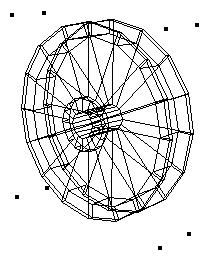
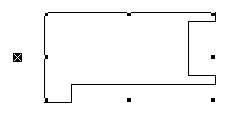
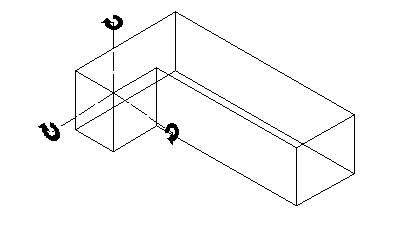
Procedure BeginSweep creates a three-dimensional sweep object in the Vectorworks document. A sweep object is a two-dimensional template object which has been rotated about a specified point to create a 3D object. For example, a circle of radius 1" that is swept about a point 2" to the right of the circles center wil create a sweep object resembling a donut, also known as a torus.
The sweep increment may also be thought of as the spacing between the duplication of radial sweep mesh lines. The "pitch", or vertical distance, is the distance that the sweep object will travel for every 360° of rotation. In sweep objects, the 2D template object may also be translated as it rotates, resulting in a "corkscrew" effect. The vertical movement is determined by the following equation: vertical movement = pitch * ArcAngle/360.
2D Object "Template" for Sweep
Sweep Object
Parameters:
startAngle Starting angle of the sweep. arcAngle Angle of sweep. incAngle Increment of sweep. PitchDistance Pitch (translation distance) of sweep. Example:
BeginSweep(#0d,#360d,#10d,0'); Poly(3 1/4",-1/2", 3 1/4",-1", 2 3/4",-1", 2 1/4",-1/2", 2 1/4",1", 1 3/4",1 1/2", -1 3/4",1 1/2", -2 1/4",1", -2 1/4",-1/2", -2 3/4",-1", -3 1/4",-1", -3 1/4",-1/2", -2 3/4",0", -2 3/4",1 1/2", -2 1/4",2", 2 1/4",2", 2 3/4",1 1/2", 2 3/4",0"); EndSweep;
| BeginXtrd | Objects - 3D |
Declaration:
PROCEDURE BeginXtrd
( startDistance :REAL; endDistance :REAL ) ; Description:
Procedure BeginXtrd creates a 3D extrude object in a Vectorworks document. BeginXtrd uses 2D object creation procedure calls to define the "template" for the object.
You should call EndXtrd after the object creation procedures to complete the definition and generate the extrude object in the document.
Parameters:
startDistance Start distance from document ground plane. endDistance End distance from document ground plane. Example:
BeginXtrd(0',4'); Rect(-1 61/64",125/128",-1 119/256",-375/512"); Rect(-1 113/512",1 113/512",-375/512",-125/256"); Rect(-125/256",125/128",0',-375/512"); Rect(125/128",125/128",1 119/256",-375/512"); Rect(1 25/512",1 113/512",375/512",-125/256"); Rect(1 363/512",1 113/512",2 101/512",-125/256"); EndXtrd; {creates an extrude using the defined rectangles, each extruded to a depth of 4'}
| Centroid3D | Objects - 3D |
Declaration:
FUNCTION Centroid3D
( object :HANDLE; VAR xCG :REAL; VAR yCG :REAL; VAR zCG :REAL ) :BOOLEAN ; Description:
Returns the center of gravity of a 3D object. The function returns TRUE if the values were found.Parameters:
object The objectt from whci to calculate the center of gravity xCG The x component of the center of gravity. yCG The y component of the center of gravity. zCG The z component of the center of gravity. Result:
Returns true if the function succeeds.
| ConvertTo3DPolys | Objects - 3D |
Declaration:
FUNCTION ConvertTo3DPolys
( original:HANDLE ) :HANDLE ; Description:
Converts an object to 3D polygons. This function successfully converts rectangles, circles, arcs, polylines, polygons, ovals, lines, straight walls, curved walls, and roofs.
Parameters:
original Handle to the original object. Example:
PROCEDURE Example; VAR h :HANDLE; BEGIN h := ConvertTo3DPolys(FSActLayer); END; RUN(Example);
| CreateContourCurves | Objects - 3D |
Declaration:
FUNCTION CreateContourCurves
( inSourceObject :HANDLE; delta :REAL; ptOnPlaneX :REAL; ptOnPlaneY :REAL; ptOnPlaneZ :REAL; normalX :REAL; normalY :REAL; normalZ :REAL ) :HANDLE ; Description:
Creates contour curves for a solid object given the delta, point on plane and plane normal. If delta is 0, only 1 curve is created, where the specified plane intersects the selected solid.Parameters:
inSourceObject Handle to a solid object delta Distance between contours ptOnPlane Point on plane used to define contours normal Plane's normal vector Result:
Returns true if the function succeeds.Example:
PROCEDURE Example; VAR inSourceObject :HANDLE; delta :REAL; ptOnPlaneX, ptOnPlaneY, ptOnPlaneZ :REAL; normalX, normalY, normalZ :REAL; h :HANDLE; BEGIN inSourceObject := FSActLayer; delta := 0; {number of slices} ptOnPlaneX := 0; ptOnPlaneY := 0; ptOnPlaneZ := 610; normalX := 0; normalY := 0; normalZ := 1; h := CreateContourCurves(inSourceObject, delta, ptOnPlaneX, ptOnPlaneY, ptOnPlaneZ, normalX, normalY, normalZ); END; RUN(Example);
| CreateExtrudeAlongPath | Objects - 3D |
Declaration:
FUNCTION CreateExtrudeAlongPath
( pathHandle :HANDLE; profileHandle :HANDLE ) :HANDLE ; Description:
Creates a new path extrude object in the document. The profile defines the shape of the cross-section, and is extruded along the path to generate the resulting object.
The path argument must be a handle to a NURBS Curve object (type 111). The profile argument must be a handle to an object of one of the following types: NURBS Curve, Polygon, Polyline, Arc, Rectangle, Rounded Rectangle, Line, Oval.
Parameters:
pathHandle Handle to the path object. profileHandle Handle to the profile object. Result:
Returns a HANDLE to the new path extrude if successful, otherwise returns NIL.
| CreateImageProp | Objects - 3D |
Declaration:
FUNCTION CreateImageProp
( propName :STRING; textureRef :LONGINT; height :REAL; width :REAL; enforceImageAspectRatio :BOOLEAN; crossedPlanes :BOOLEAN; createPlugin :BOOLEAN; autoRotate :BOOLEAN; createSymbol :BOOLEAN ) :HANDLE ; Description:
Create an image prop from the options specified.
The texture resource and optional symbol created will use names derived from the propName parameter. If those names are being used then unique names will be assigned. If enforceImageAspectRatio is true, depending on deriveWidthFromHeight the prop width/height will be derived from the prop height/width and the texture's image aspect ratio. Otherwise the height and width can be set independently of the texture's image aspect ratio.
| CreateTaperedExtrude | Objects - 3D |
Declaration:
FUNCTION CreateTaperedExtrude
( profileH :HANDLE; angle :REAL; height :REAL ) :HANDLE ; Description:
Creates a new tapered extrude object in the document.Parameters:
profileH Handle to object defining profile geometry. angle Taper angle of extrude (in degrees). height Height of extrude. Result:
Returns a HANDLE to the new tapered extrude if successful, otherwise returns NIL.
| EndMesh | Objects - 3D |
Declaration:
PROCEDURE EndMesh
; Description:
Procedure EndMesh completes the definition of a mesh object within a Vectorworks document. On calling EndMesh, the mesh is created in the document from the preceding object creation calls.
It is recommended to call ResetOrientation3D after 3D object creations in order to ensure that the new 3D objects will draw properly.
Example:
BeginMesh; ClosePoly; PenSize(1); PenPat(2); FillPat(0); Poly3D(0',0',4'-0",4'-0",0',4'-0",4'-0",-4'-0",4'-0",0',-4'-0",4'-0"); Smooth(0); Poly3D(0',0',0',4'-0",0',0',4'-0",-4'-0",0',0',-4'-0",0'); Smooth(0); Poly3D(0',-4'-0",0',0',-4'-0",4'-0",0',0',4'-0",0',0',0'); Poly3D(4'-0",-4'-0",0',4'-0",-4'-0",4'-0",0',-4'-0",4'-0",0',-4'-0",0'); Poly3D(4'-0",0',0',4'-0",0',4'-0",4'-0",-4'-0",4'-0",4'-0",-4'-0",0'); Poly3D(0',0',0',0',0',4'-0",4'-0",0',4'-0",4'-0",0',0'); EndMesh;
| EndMXtrd | Objects - 3D |
Declaration:
PROCEDURE EndMXtrd
; Description:
Procedure EndMXtrd completes the definition of a multiple extrude object within a Vectorworks document. On calling EndMXtrd, the object is created in the document from the preceding object creation calls.
It is recommended to call ResetOrientation3D after 3D object creations in order to ensure that the new 3D objects will draw properly.
Example:
BeginMXtrd(0',1 363/512"); Rect(-125/128",1 113/512",375/512",375/512"); Rect(-25/32",1 113/512",275/512",375/512"); Rect(-75/128",1 113/512",325/1024",375/512"); Locus(-275/2048",125/128"); Rect(-75/128",1 113/512",325/1024",375/512"); Rect(-25/32",1 113/512",275/512",375/512"); Rect(-125/128",1 113/512",375/512",375/512"); EndMXtrd;
| EndPoly3D | Objects - 3D |
Declaration:
PROCEDURE EndPoly3D
; Description:
Procedure EndPoly3D completes the definition of a multiple extrude object within a Vectorworks document. On calling EndPoly3D, the object is created in the document from the preceding object creation calls.
It is recommended to call ResetOrientation3D after 3D object creations in order to ensure that the new 3D objects will draw properly.
Example:
BeginPoly3D; Add3DPt(0,0,0); Add3DPt(2,0,0); Add3DPt(2,2,0); Add3DPt(1,3,0); Add3DPt(0,2,0); Add3DPt(0,0,0); EndPoly3D;See Also:
BeginPoly3D Add3DPt
| EndSweep | Objects - 3D |
Declaration:
PROCEDURE EndSweep
; Description:
Procedure EndSweep completes the definition of a sweep object within a Vectorworks document. On calling EndSweep, the object is created in the document from the preceding object creation calls.
It is recommended to call ResetOrientation3D after 3D object creations in order to ensure that the new 3D objects will draw properly.
Example:
BeginSweep(#0°,#360°,#10°,0'); Poly(3 1/4",-1/2",3 1/4",-1",2 3/4",-1", 2 1/4",-1/2",2 1/4",1",1 3/4",1 1/2", -1 3/4",1 1/2",-2 1/4",1",-2 1/4",-1/2", -2 3/4",-1",-3 1/4",-1",-3 1/4",-1/2", -2 3/4",0",-2 3/4",1 1/2",-2 1/4",2", 2 1/4",2",2 3/4",1 1/2",2 3/4",0"); EndSweep;
| EndXtrd | Objects - 3D |
Declaration:
PROCEDURE EndXtrd
; Description:
Procedure EndXtrd completes the definition of an extrude object within a Vectorworks document. On calling EndXtrd, the object is created in the document from the preceding object creation calls.
It is recommended to call ResetOrientation3D after 3D object creations in order to ensure that the new 3D objects will draw properly.
Example:
BeginXtrd(0',4'); Rect(-1 61/64",125/128",-1 119/256",-375/512"); Rect(-1 113/512",1 113/512",-375/512",-125/256"); Rect(-125/256",125/128",0',-375/512"); Rect(125/128",125/128",1 119/256",-375/512"); Rect(1 25/512",1 113/512",375/512",-125/256"); Rect(1 363/512",1 113/512",2 101/512",-125/256"); EndXtrd;
| Get3DCntr | Objects - 3D |
Declaration:
PROCEDURE Get3DCntr
( h :HANDLE; VAR pX :REAL; VAR pY :REAL; VAR zValue :REAL ) ; Description:
Procedure Get3DCntr returns the three-dimensional center point of the referenced 3D object.
Parameters:
h Handle to object. p Returns coordinates of object center point. zValue Returns elevation of object center point. Example:
PROCEDURE IncreaseExtr; {This script increases extruded objects in the selection by a user requested value.} {by Paolo, on the VectorScript bulletin board} VAR oggetto :HANDLE; increaseValue :REAL; FUNCTION Increase(h :HANDLE) :BOOLEAN; VAR height, width, depth :REAL; xRot, yRot, zRot :REAL; p0X, p0Y, p0Z :REAL; p1X, p1Y, p1Z :REAL; result, isMirroredXY :BOOLEAN; BEGIN {check if the obj is an extrusion} if (GetType(h) = 24) THEN BEGIN result := Get3DOrientation(h, xRot, yRot, zRot, isMirroredXY); Get3DCntr(h, p0X, p0Y, p0Z); SetRot3D(h, 0, 0, 0, 0, 0, 0); {here depth = extrusion value} Get3DInfo(h, height, width, depth); {I increase the depth} SET3DInfo(h, height, width, depth + increaseValue); SET3DRot(h, xRot, yRot, zRot , 0,0,0); Get3DCntr(h, p1X, p1Y, p1Z); {move of the misplacement p0-p1} Move3DObj(h, p0X-p1X, p0Y-p1Y, p0Z-p1Z); Get3DCntr(h, p1X, p1Y, p1Z); END; increase := FALSE; END; BEGIN {ask the value to increase} increaseValue := RealDialog('Increase extrusions in the selection of this value','10'); {apply to the selected set of objects} ForEachObjectInList(increase, 2, 0, oggetto); END; RUN(IncreaseExtr);
| Get3DInfo | Objects - 3D |
Declaration:
PROCEDURE Get3DInfo
( h :HANDLE; VAR height :REAL; VAR width :REAL; VAR depth :REAL ) ; Description:
Procedure Get3DInfo returns the height, width and depth values of the referenced 3D object.
Parameters:
h Handle to 3D object. height Height of object. width Width of object. depth Depth of object. Example:
PROCEDURE GetBBox3D(h :HANDLE; VAR x1, y1, z1, x2, y2, z2 :REAL); VAR garb_r, z_span, z_center :REAL; BEGIN GetBBox(h, x1, y1, x2, y2); Get3DInfo(h, garb_r, garb_r, z_span); Get3DCntr(h, garb_r, garb_r, z_center); z1 := z_center - (z_span / 2); z2 := z_center + (z_span / 2); END;
| Get3DOrientation | Objects - 3D |
Declaration:
FUNCTION Get3DOrientation
( h :HANDLE; VAR xRot :REAL; VAR yRot :REAL; VAR zRot :REAL; VAR isMirroredXY :BOOLEAN ) :BOOLEAN ; Description:
Function Get3DOrientation returns the 3D orientation of the referenced object.
If the object is mirrored, a reflection across the X-Y plane must be applied before rotating by the angles above in order to reproduce the object's orientation.Parameters:
h Handle to 3D object. xRot Returns X rotation value. yRot Returns Y rotation value. zRot Returns Z rotation value. isMirroredXY Returns mirror status of object. Result:
Get3DOrientation returns TRUE if a valid 3D object was passed to the procedure.
| GetLocus3D | Objects - 3D |
Declaration:
PROCEDURE GetLocus3D
( h :HANDLE; VAR pX :REAL; VAR pY :REAL; VAR pZ :REAL ) ; Description:
Procedure GetLocus3D returns the coordinates of the referenced 3D locus object.
Parameters:
h Handle to 3D locus. p Returns 3D coordinates of locus.
| GetPolyPt3D | Objects - 3D |
Declaration:
PROCEDURE GetPolyPt3D
( objectHd :HANDLE; index :INTEGER; VAR pX :REAL; VAR pY :REAL; VAR pZ :REAL ) ; Description:
Procedure GetPolyPt3D returns the coordinates of the specified vertex of the referenced mesh, 3D polygon, or NURBS curve object.
Error checking for valid index values must be provided by the programmer.
Parameters:
objectHd Handle to 3D mesh or polygon. index Index of vertex (range of 0 to n-1). p Returns 3D coordinates of vertex. Example:
for i := 0 to (GetVertNum(thePoly) - 1) do begin GetPolyPt3D(thePoly, i, vertX, vertY, vertZ); end;
| HExtrude | Objects - 3D |
Declaration:
FUNCTION HExtrude
( objectH :HANDLE; bottom :REAL; top :REAL ) :HANDLE ; Description:
Creates an extrude object from the specified object.Parameters:
objectH The profile to be extruded. bottom The z height of the bottom of the extrude. top The z height of the top of the extrude. Result:
A handle to the newly created extrude object.
| Locus3D | Objects - 3D |
Declaration:
PROCEDURE Locus3D
( pX :REAL; pY :REAL; pZ :REAL ) ; Description:
Procedure Locus3D creates a new 3D locus in the document at the specified 3D coordinate location.
Parameters:
p 3D coordinates of new locus.
| MeshToGroup | Objects - 3D |
Declaration:
FUNCTION MeshToGroup
( meshObj:HANDLE ) :HANDLE ; Description:
Converts meshObj to a group of 3D polygons.Parameters:
meshObj Handle to a mesh object Result:
Returns a handle containing 3D polygons.See Also:
GroupToMesh
| Moments3D | Objects - 3D |
Declaration:
FUNCTION Moments3D
( object :HANDLE; VAR lxx :REAL; VAR lyy :REAL; VAR lzz :REAL ) :BOOLEAN ; Description:
Returns the moments of inertia of a 3D object about the x, y, and z axes of a point at the center of gravity of the object.Parameters:
object The object for which to find the 3D moments. lxx The moment of inertia relative to the x-axis passing through the center of mass of object lyy The moment of inertia relative to the y-axis passing through the center of mass of object lzz The moment of inertia relative to the z-axis passing through the center of mass of object Result:
Returns true if the function succeeded.
| Poly3D | Objects - 3D |
Declaration:
PROCEDURE Poly3D
( p :REAL ) ; Description:
Procedure Poly3D creates a three dimensional polygon in a Vectorworks document. The vertices of the polygon are specified by a list of parameters x1, y1, z1 through xn, yn, and zn, which specify the coordinate locations of each vertex.
Example:
Poly3D(1,1,0,1.5,1.5,1,2.5,1.5,1,);
| Products3D | Objects - 3D |
Declaration:
FUNCTION Products3D
( object :HANDLE; VAR lxy :REAL; VAR lyz :REAL; VAR lzx :REAL ) :BOOLEAN ; Description:
Returns the products of inertia of a 3D object for the xy, yz, and zx planes passing through a point at the center of gravity of the object.Parameters:
object The object from which to calculate the Products lxy Theh product of inertia with respect to the YZ and XZ planes passing through the center of mass of object. lyz Theh product of inertia with respect to the XZ and XY planes passing through the center of mass of object. lzx Theh product of inertia with respect to the XY and YZ planes passing through the center of mass of object. Result:
Returns true if the function succeeds.
| Set3DInfo | Objects - 3D |
Declaration:
PROCEDURE Set3DInfo
( h :HANDLE; heightDistance :REAL; widthDistance :REAL; depthDistance :REAL ) ; Description:
Procedure Set3DInfo sets the height, width and depth dimensions of the referenced object.
Parameters:
h Handle to 3D object. heightDistance New height of object. widthDistance New width of object. depthDistance New depth of object.
| Set3DRot | Objects - 3D |
Declaration:
PROCEDURE Set3DRot
( h :HANDLE; xAngle :REAL; yAngle :REAL; zAngle :REAL; xDistance :REAL; yDistance :REAL; zDistance :REAL ) ; Description:
Procedure Set3DRot rotates the referenced 3D object about a specified 3D point. It works with the following 3D objects: extrude, multiple extrude, sweep, mesh, 3D polygon, solid, CSG solid, group, symbol, plug-in object, NURBS curve, NURBS surface.
The difference between Set3DRot and SetRot3D is that Set3DRot adds the specified rotation to the existing rotation of the object, whereas SetRot3D does not consider the existing rotation, and merely makes the object rotation match the specified values.Parameters:
h Handle to 3D object. xAngle X axis rotation angle. yAngle Y axis rotation angle. zAngle Z axis rotation angle. xDistance X coordinate of center of rotation. yDistance Y coordinate of center of rotation. zDistance Z coordinate of center of rotation. Example:
Set3DRot(hd,10d,30d,23d45',3,3,2);See Also:
SetRot3D
| SetPolyPt3D | Objects - 3D |
Declaration:
PROCEDURE SetPolyPt3D
( objectHd :HANDLE; index :INTEGER; pX :REAL; pY :REAL; zValue :REAL ) ; Description:
Procedure SetPolyPt3D sets the position of the specified vertex in the referenced 3D object.
Parameters:
objectHd Handle to mesh or 3D poly object. index Index of vertex point. p New X-Y coordinates of vertex. zValue New elevation of vertex. Example:
SetPolyPt3D(objectHandle,3,2.5",3",8");
| SetRot3D | Objects - 3D |
Declaration:
PROCEDURE SetRot3D
( h :HANDLE; xAngle :REAL; yAngle :REAL; zAngle :REAL; xDistance :REAL; yDistance :REAL; zDistance :REAL ) ; Description:
Procedure SetRot3D sets the rotation (in degrees) of the referenced object to the specified rotations and center. This procedure works on the following 3D objects: extrudes, multiple extrudes, and sweeps.
The difference between Set3DRot and SetRot3D is that Set3DRot adds the specified rotation to the existing rotation of the object, whereas SetRot3D does not consider the existing rotation, and merely makes the object rotation match the specified values.Parameters:
h Handle to 3D object. xAngle New X rotation angle. yAngle New Y rotation angle. zAngle New Z rotation angle. xDistance X coordinate of rotation center. yDistance Y coordinate of rotation center. zDistance Z coordinate of rotation center. See Also:
Set3DRot