AddButton Dialogs - Classic 

Declaration:

PROCEDURE   AddButton
(   buttonStr :STRING;
    itemID :INTEGER;
    buttonType :INTEGER;
    x1 :INTEGER;
    y1 :INTEGER;
    x2 :INTEGER;
    y2 :INTEGER
) ;

Description:

Defines the standard button types (such as the OK or Cancel buttons, check boxes, radio buttons) within a custom dialog definition.

In addition to the regular button styles, there are also two "auto" button styles. These styles(check box and radio button) automatically handle user selection- deselection, and can be activated or deactivated by calling SetItemEnable.

To create a default button, assign the button an item ID of 1.

Table - Custom Dialog Button Styles

Button Style Style Constant
Standard Button 1
Check Box 2
Radio Button 3
Auto Check Box 4
Auto Radio Button 5

Parameters:

buttonStr Descriptive text for dialog button.
itemID Unique itemID for the dialog button, in a range of 1-50.
buttonType Style of dialog button control.
x1 Top left X coordinate of button bounding box.
y1 Top left Y coordinate of button bounding box.
x2 Bottom right X coordinate of button bounding box.
y2 Bottom right Y coordinate of button bounding box.

Example:

{creates a check box }
AddButton('Use Sound',4,3,25,60,125,80);

{creates a push button that is the default button of the dialog }
AddButton('OK',1,1,25,60,125,80);

See Also:

SetItemEnable  


  AddChoiceItem Dialogs - Classic 

Declaration:

PROCEDURE   AddChoiceItem
(   choiceTitle :STRING;
    itemID :INTEGER;
    choiceType :INTEGER;
    x1 :INTEGER;
    y1 :INTEGER;
    x2 :INTEGER;
    y2 :INTEGER
) ;

Description:

Adds a choice item control to a custom dialog definition. A choice item allows the user to select an item from multiple list options. Options for the itemID parameter are: 1) pop-up, 2) multi-select list box, and 3) single-select list box.

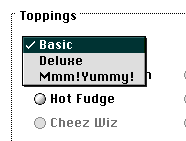
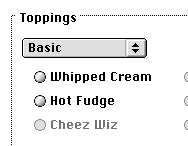
Combo Box-Popup Default State


Combo Box-Popup Open State


Parameters:

choiceTitle Descriptive text string for the choice item.
itemID Unique item ID for the choice item control, in a range of 1-50.
choiceType The type (style) of choice item control to be displayed.
x1 Top left X coordinate of the control bounding box.
y1 Top left Y coordinate of the control bounding box.
x2 Bottom right X coordinate of control bounding box.
y2 Bottom right Y coordinate of control bounding box.

Example:

AddChoiceItem('Topping Type',4,1,25,50,150,115);

See Also:

InsertChoice  


  AddField Dialogs - Classic 

Declaration:

PROCEDURE   AddField
(   fieldStr :STRING;
    itemID :INTEGER;
    fieldType :INTEGER;
    x1 :INTEGER;
    y1 :INTEGER;
    x2 :INTEGER;
    y2 :INTEGER
) ;

Description:

Defines a static or editable text field within the custom dialog definition. Note: single line edit fields should be 16 pixels high.

Note: Static and editiable text fields can be activated or deactivated using SetItemEnable().

Table - Field Types

Button Style Style Constant
Static Text Field 1
Editable Text Field 2


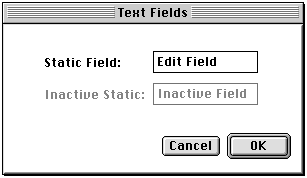
Text Field Types


Parameters:

fieldStr The descriptive text for the field item.
itemID Unique item ID for the dialog field, in a range of 1-50.
fieldType The type of field item to be displayed.
x1 Top left X coordinate of field item bounding box.
y1 Top left Y coordinate of field item bounding box.
x2 Bottom right X coordinate of field item bounding box
y2 Bottom right Y coordinate of field item bounding box.

Example:

AddField('Enter number:',4,1,35,64,115,80);


  AddGroupBox Dialogs - Classic 

Declaration:

PROCEDURE   AddGroupBox
(   s :STRING;
    item :INTEGER;
    left :INTEGER;
    top :INTEGER;
    right :INTEGER;
    bottom :INTEGER
) ;

Description:

Adds a group box to a custom dialog.

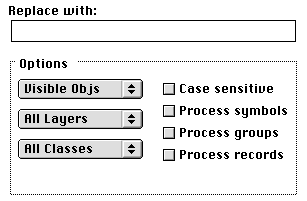
Group Box Dialog Control


Parameters:

s Group box title string.
item Dialog item ID value.
left Top left X coordinate of group box bounds in dialog.
top Top left Y coordinate of group box bounds in dialog.
right Bottom right X coordinate of group box bounds in dialog.
bottom Bottom right Y coordinate of group box bounds in dialog.

Example:

AddField('Find:',3,1,16,10,95,36);
AddField('',4,2,20,30,305,46);
AddField('Replace with:',5,1,16,59,113,75);
AddField('',6,2,20,80,305,96);
AddGroupBox('Options',7,20,110,305,250);	
AddChoiceItem('Text Options',8,1,27,135,152,145);
AddChoiceItem('Layer Options',9,1,27,165,152,175);


  AddHelpItem Dialogs - Classic 

Declaration:

PROCEDURE   AddHelpItem
(   itemID :INTEGER;
    x1 :INTEGER;
    y1 :INTEGER;
    x2 :INTEGER;
    y2 :INTEGER
) ;

Description:

Adds a help item to a custom dialog layout.

Parameters:

itemID The id of the help control item.
x1 X coordinate of top left corner of control.
y1 Y coordinate of top left corner of control.
x2 X coordinate of bottom right corner of control.
y2 Y coordinate of bottom right corner of control.


  BeginDialog Dialogs - Classic 

Declaration:

PROCEDURE   BeginDialog
(   dialogID :INTEGER;
    dialogType :INTEGER;
    x1 :INTEGER;
    y1 :INTEGER;
    x2 :INTEGER;
    y2 :INTEGER
) ;

Description:

Initiates the custom dialog definition process. All VectorScript calls made between the BeginDialog and EndDialog will be used to construct a custom dialog.

Parameters:

dialogID Unique identifier ID for dialog(in a range of 1-32).
dialogType Dialog style(always pass 1 for this parameter).
x1 Top left X coordinate of custom dialog window.
y1 Top left Y coordinate of custom dialog window.
x2 Bottom right X coordinate of custom dialog window.
y2 Bottom right Y coordinate of custom dialog window.

Example:

BeginDialog(1,1,TLeft,100,BRight,SCH);


  ClrDialog Dialogs - Classic 

Declaration:

PROCEDURE   ClrDialog
;

Description:

Closes the frontmost displayed custom dialog..


  DialogEvent Dialogs - Classic 

Declaration:

PROCEDURE   DialogEvent
VAR item:INTEGER ) ;

Description:

Monitors user activity within a dialog; when an item is selected, the numeric identifier of the item is returned.

Parameters:

item Returns item selected in dialog event.

Example:

REPEAT
  DialogEvent(Item);
		
  CASE Item OF
  {- OK button case -}
  1:Done:=TRUE;
  {- Cancel button case -}
  2:Stop:=TRUE;
  OTHERWISE SysBeep;
  END;
UNTIL Done;


  DrawDialog Dialogs - Classic 

Declaration:

PROCEDURE   DrawDialog
;

Description:

Redraws the frontmost custom dialog.


  EndDialog Dialogs - Classic 

Declaration:

PROCEDURE   EndDialog
;

Description:

Terminates the dialog definition process.


  GetDialog Dialogs - Classic 

Declaration:

PROCEDURE   GetDialog
( dialogID:INTEGER ) ;

Description:

Displays the specified custom dialog and brings it to the front of the dialog order.

Note: This procedure should NOT be a part of the dialog definition.

Parameters:

dialogID ID number of dialog to be displayed.

Example:

BEGIN
  Done:=False;
  Stop:=FALSE;
		
  GetDialog(1);
  SetTitle('Dessert Toppings');
  InsertChoice(4,0,'Basic');
  InsertChoice(4,1,'Deluxe');
  InsertChoice(4,2,'Mmm!Yummy!');


  SetTitle Dialogs - Classic 

Declaration:

PROCEDURE   SetTitle
( theTitle:STRING ) ;

Description:

Sets the title of custom dialogs in VectorScript. The title will be displayed in the dialogs' title bar.

Parameters:

theTitle Title string of dialog.

Example:

GetDialog(1);
SetTitle('Find-Replace Text');
InsertChoice(8,1,'Selected Text');
InsertChoice(8,2,'Selected Objs');