| DelChoice | Dialogs - Handler |
Declaration:
PROCEDURE DelChoice
( item :INTEGER; whichChoice :INTEGER ) ; Description:
Procedure DelChoice deletes an item from a VectorScript dialog choice item list.Parameters:
item Item ID of dialog control. whichChoice Position in list of item to be deleted. Example:
numOptions:=NumChoices(8); DelChoice(8,(numChoices-1));
| GetChoiceStr | Dialogs - Handler |
Declaration:
PROCEDURE GetChoiceStr
( item :INTEGER; whichChoice :INTEGER; VAR s :STRING ) ; Description:
GetChoiceStr returns the string associated with a particular choice item value.Parameters:
item Item ID of dialog control. whichChoice Position of choice item in list (in a range of 0 - n). s Returns string value associated with position in list. Example:
GetChoiceStr(7,1,returnStr);See Also:
GetSelChoice
| GetField | Dialogs - Handler |
Declaration:
FUNCTION GetField
( fieldID:INTEGER ) :DYNARRAY[] of CHAR ; Description:
Function GetField retrieves the text from a text field. This procedure is called when exiting a custom dialog to retrieve user data.Parameters:
fieldID Item ID of field from which to retrieve data. Example:
REPEAT DialogEvent(Item); CASE Item OF {// OK Button //} 1:BEGIN Done:=TRUE; targetValue := GetField(4); replaceValue:= GetField(6); IF ItemSel(9) THEN textMode:=2; IF ItemSel(10) THEN textMode:=4; IF ItemSel(11) THEN textMode:=8;
| GetSelChoice | Dialogs - Handler |
Declaration:
PROCEDURE GetSelChoice
( item :INTEGER; atChoice :INTEGER; VAR choiceNumber :INTEGER; VAR choiceString :STRING ) ; Description:
Procedure GetSelChoice returns the selected value in a VectorScript choice item.
Note that choiceNumber is 1-based for Classic dialogs, and 0-based for Modern dialogs.Parameters:
item Item ID of dialog control. atChoice Position in list where search begins (Pass 0 to retrieve the first one; to retrieve the next one, pass choiceNumber + 1). choiceNumber Returns index of selected item in choice list. choiceString Returns string of selected item in choice list.
| InsertChoice | Dialogs - Handler |
Declaration:
PROCEDURE InsertChoice
( item :INTEGER; before :INTEGER; choice :STRING ) ; Description:
Procedure InsertChoice adds a new value to a dialog choice item list.Parameters:
item Item ID of dialog control. before Position in list where new item will be inserted. choice String value of new item.
| ItemSel | Dialogs - Handler |
Declaration:
FUNCTION ItemSel
( fieldID:INTEGER ) :BOOLEAN ; Description:
Function ItemSel returns TRUE if the specified checkbox or radio button is selected. This procedure is used to return the status of check boxes or radio buttons when exiting a custom dialog.Parameters:
fieldID Item ID of dialog control whose state will be returned. Example:
REPEAT DialogEvent(Item); CASE Item OF {// OK Button //} 1:BEGIN Done:=TRUE; targetValue := GetField(4); replaceValue:= GetField(6); IF ItemSel(9) THEN textMode:=2; IF ItemSel(10) THEN textMode:=4; IF ItemSel(11) THEN textMode:=6;
| NumChoices | Dialogs - Handler |
Declaration:
FUNCTION NumChoices
( item:INTEGER ) :INTEGER ; Description:
Function NumChoices returns the number of values available in the specified VectorScript dialog choice item list.Parameters:
item Item ID of dialog choice item control. Example:
numOptions:=NumChoices(8);
| SelChoice | Dialogs - Handler |
Declaration:
PROCEDURE SelChoice
( item :INTEGER; choice :INTEGER; select :BOOLEAN ) ; Description:
Procedure SelChoice makes a specified list value the selected value for the choice item. To make no item selected, supply -1 as the choice parameter.Parameters:
item Item ID of dialog control. choice Position (0-based) in list of item to be set as selected. select Selection status of list item. Example:
PROCEDURE Example; VAR dialog1 :INTEGER; result :INTEGER; PROCEDURE Dialog_Handler(VAR item :LONGINT; data :LONGINT); BEGIN IF item = SetUpDialogC THEN BEGIN InsertChoice(4, 0, 'One'); InsertChoice(4, 1, 'Two'); InsertChoice(4, 2, 'Three'); SelChoice(4, 1, TRUE); END; END; BEGIN dialog1 := CreateLayout('Example Dialog', FALSE, 'OK', ''); CreatePullDownMenu(dialog1, 4, 16); SetFirstLayoutItem(dialog1, 4); result := RunLayoutDialog(dialog1, Dialog_Handler); END; RUN(Example);
| SelField | Dialogs - Handler |
Declaration:
PROCEDURE SelField
( fieldID:INTEGER ) ; Description:
Procedure SelField activates and highlights the specified text field. This call is useful for highlighting a default field value so it can be deleted and replaced by a user-input value.Parameters:
fieldID Item ID of dialog field to highlight/select. Example:
GetDialog(1); SetTitle('Find-Replace Text'); SelField(4);
| SetField | Dialogs - Handler |
Declaration:
PROCEDURE SetField
( fieldID :INTEGER; str :DYNARRAY[] of CHAR ) ; Description:
Procedure SetField updates the text in the specified text field. Static or editable fields may be updated using this call, which can only be used while the dialog is displayed on screen.Parameters:
fieldID Item ID of dialog field to be updated. str New string value for field. Example:
CASE whatSelected OF 1:BEGIN SetItemEnable(11,TRUE); SetItemEnable(12,FALSE); SetItemEnable(13,FALSE); SetItemEnable(14,FALSE); END; 2:BEGIN SetField(11,'Use Class Settings'); SetItemEnable(11,TRUE); SetField(12,'Use Layer Settings'); SetItemEnable(12,TRUE); END;
| SetHelpString | Dialogs - Handler |
Declaration:
PROCEDURE SetHelpString
( itemID :INTEGER; helpString :STRING ) ; Description:
Sets the help string for the specified dialog control item. When the custom dialog is displayed and the cursor is moved over this item, the string will be displayed in the help item. Prior to calling this function, a help item must have been defined with AddHelpItem.Parameters:
itemID The index of the dialog control item for which this help string will be displayed. helpString The help string for the control item.
| SetItem | Dialogs - Handler |
Declaration:
PROCEDURE SetItem
( fieldID :INTEGER; select :BOOLEAN ) ; Description:
Procedure SetItem selects or deselects the specified check box or radio button.
Auto button styles do not require this call for activation/deactivation.Parameters:
fieldID Item ID of dialog control to be selected or deselected. select Selection status to be assigned to button.
| SetItemEnable | Dialogs - Handler |
Declaration:
PROCEDURE SetItemEnable
( item :INTEGER; enable :BOOLEAN ) ; Description:
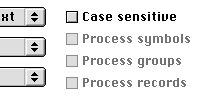
Procedure SetItemEnable sets the enable state of a custom dialog item. When an item is enabled, it is available as a valid choice in the dialog; when disabled, an item is grayed and cannot be chosen by the user. SetItemEnable supports all custom dialog controls in VectorScript.
Enable States of Dialog Items
Parameters:
item Item ID of dialog control whose enable state will be modified. enable New enable state of dialog control. Example:
InsertChoice(10,1,'All Classes'); InsertChoice(10,2,'Visible Classes'); SetItemEnable(11,TRUE); SetItemEnable(12,FALSE); SetItemEnable(13,FALSE); SetItemEnable(14,FALSE);
| SetTextEditable | Dialogs - Handler |
Declaration:
PROCEDURE SetTextEditable
( item :INTEGER; editable :BOOLEAN ) ; Description:
Sets the editable state of a text field in an existing dialog. This function should be called from the event handler for the dialog, not during the dialog setup.Parameters:
item the id of the item editable editable state